Tuya BLE breakers → Home Assistant
Tuya Bluetooth breakers and switches normally need the Tuya cloud and app. This tiny ESP32-C3 bridge speaks the full Tuya BLE protocol locally — SMP pairing, AES-CBC encrypted commands — and exposes a clean switch entity to Home Assistant over MQTT. No cloud, no app, all on your own network.
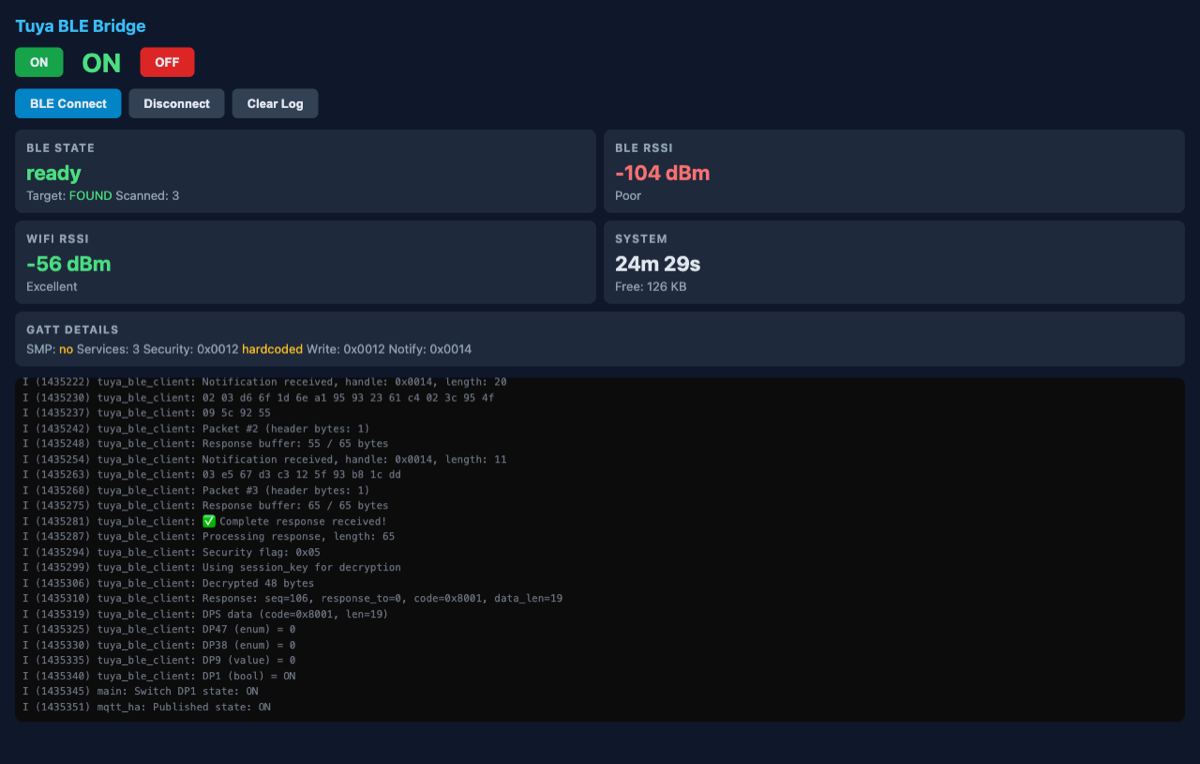
The built-in web dashboard: live BLE/Wi-Fi status, RSSI, GATT details, switch controls and a streaming log.
What it does
Full Tuya BLE protocol
SMP pairing, GATT discovery and AES-CBC encrypted commands — the same handshake the Tuya app uses, reimplemented on the ESP32-C3.
Connect-on-demand
BLE only connects when a command is sent and disconnects after a 15 s idle timeout — minimal radio use, plays nice with other BLE gear.
Home Assistant native
MQTT auto-discovery creates a switch entity automatically — no YAML. Plus a built-in web dashboard with live BLE/Wi-Fi status, GATT details and a log viewer.
How it works
A connect-on-demand flow keeps the BLE link idle until you actually toggle the switch:
Home Assistant / Web UI
   │  MQTT command (ON/OFF)
   ▼
ESP32-C3 bridge
   1. receive command
   2. BLE connect (if idle)
   3. SMP pair → GATT discover → Tuya handshake
   4. send encrypted switch command (DP ID)
   5. read state confirmation
   6. publish state to MQTT
   7. idle 15s → disconnect
   ▼
Tuya BLE breaker
{prefix}/command
HA → bridge: ON / OFF.
{prefix}/state
Bridge → HA: current state.
{prefix}/availability
Bridge → HA: online when BLE ready.
Get it running
1 · Get your Tuya credentials
You need four values for your device — easiest via tinytuya:
pip install tinytuya
python -m tinytuya wizard
Gives you Device ID, Local Key, UUID and MAC.
2 · Flash (ESP-IDF)
git clone https://github.com/hms-homelab/hms-esp-tuya-ble
cd hms-esp-tuya-ble
idf.py menuconfig   # WiFi · Tuya creds · MQTT
idf.py build
idf.py -p /dev/ttyACM0 flash monitor
3 · Home Assistant
A switch entity appears automatically via MQTT discovery. Toggle it from HA, or open the bridge's web dashboard at http://<bridge-ip>/ for live BLE/Wi-Fi status, RSSI, GATT handles and a scrolling log. Because BLE is connect-on-demand, the switch may show briefly "unavailable" between commands — it reconnects on the next toggle.